01-案例介绍
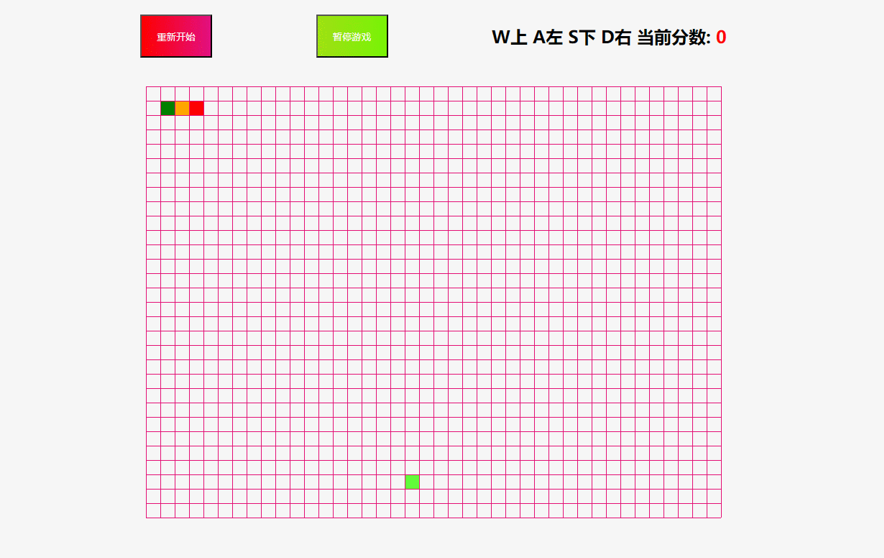
02-面向对象思维分析
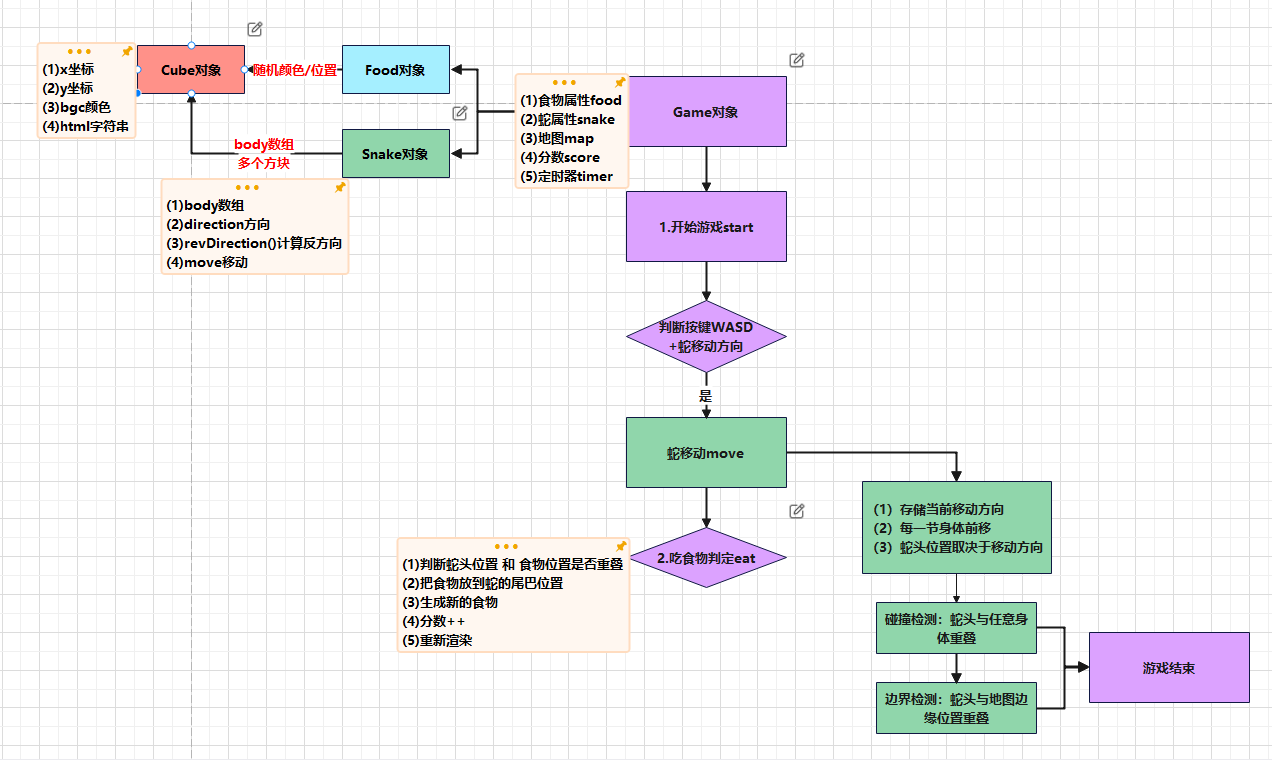
03-构建方块对象
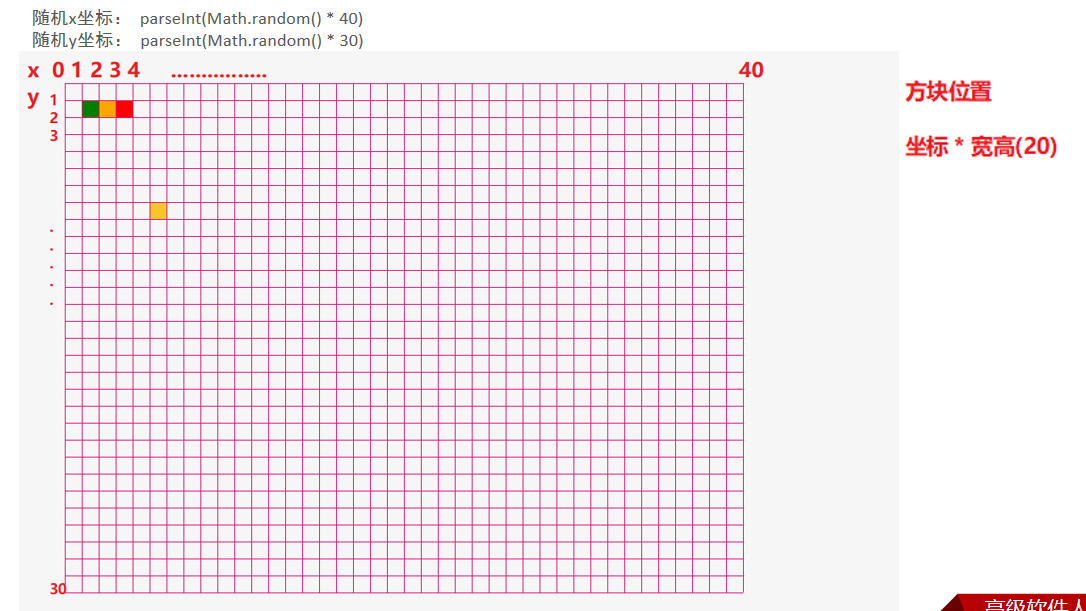
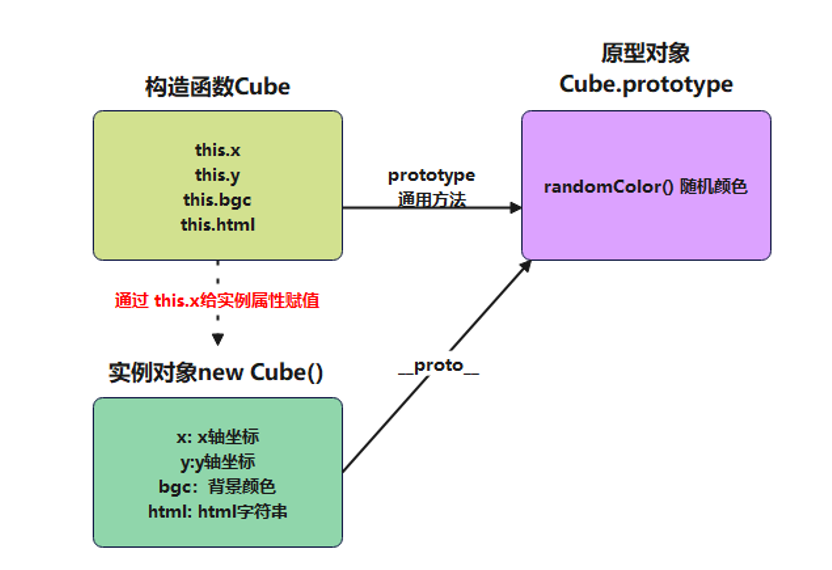
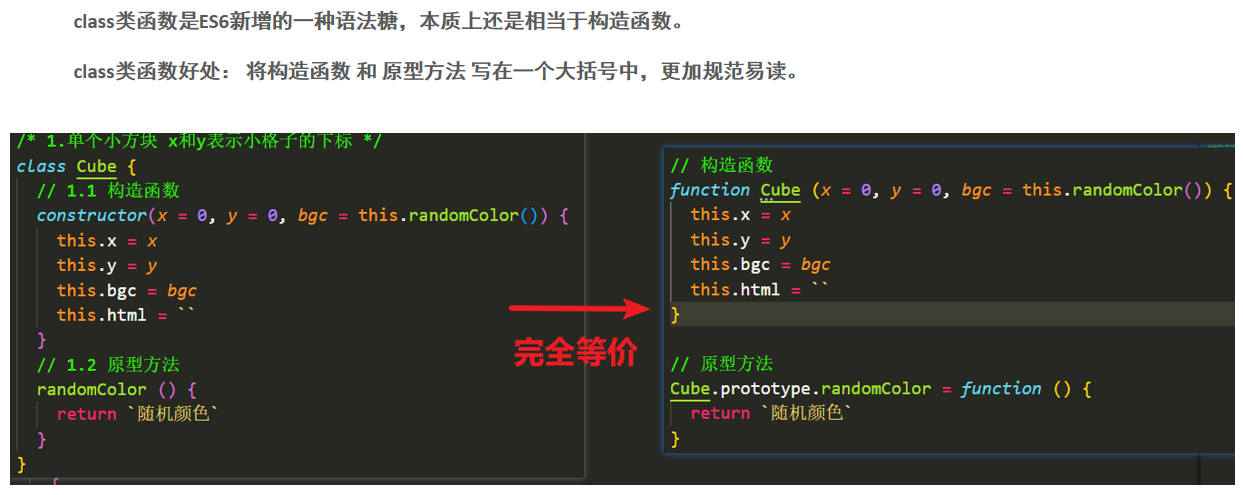
/* 1.方块对象Cube (8行js) */
class Cube {
  // 1.1 构造函数
  constructor(x = 0, y = 0, bgc = this.randomColor()) {
    this.x = x
    this.y = y
    this.bgc = bgc
    this.html = `<div class="cube" style="left:${x * 20}px;top:${y * 20}px;background-color:${bgc}"></div>`
  }

  // 1.2 原型
  randomColor () {
    // rgb(0-255,0-255,0-255)

    return `rgb( ${parseInt(Math.random() * 256)} , ${parseInt(Math.random() * 256)} , ${parseInt(Math.random() * 256)} )`
  }
}
04-构建食物对象
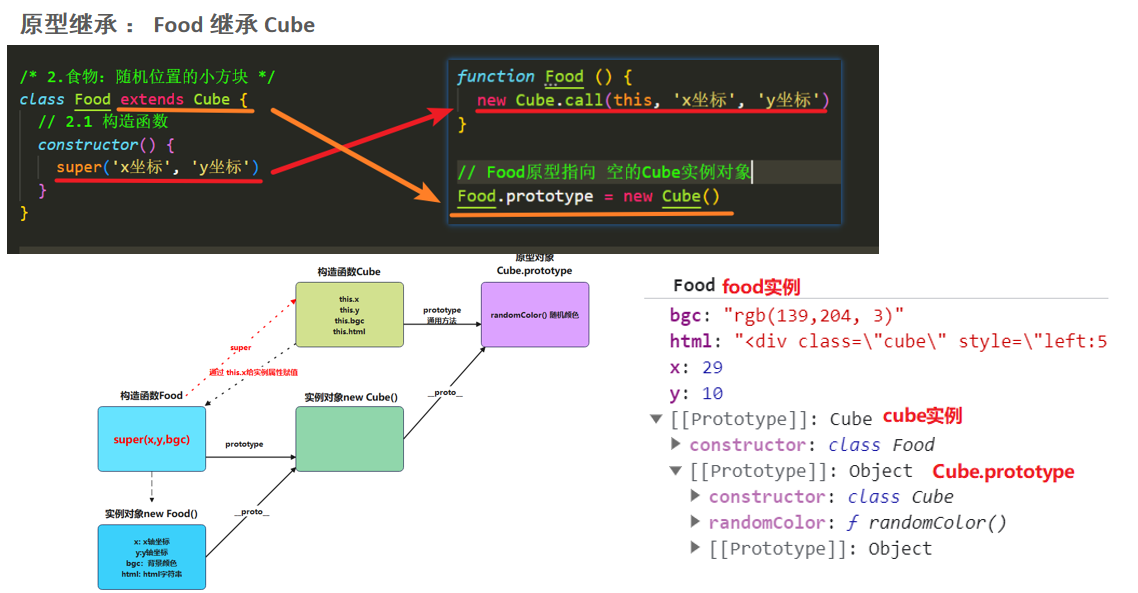
/* 2.食物对象Food (3行js) */
class Food extends Cube {
  // 2.1 构造函数
  constructor() {
    super(parseInt(Math.random() * 40), parseInt(Math.random() * 30))
  }
}
05-构建蛇对象
/* 3.蛇对象Snake(18行js) */
class Snake {
  // 3.1 构造函数
  constructor() {
    this.body = [
      { x: 5, y: 1, bgc: 'red' },
      { x: 4, y: 1, bgc: 'orange' },
      { x: 3, y: 1, bgc: 'green' },
      { x: 2, y: 1, bgc: 'purple' },
      { x: 1, y: 1, bgc: 'blue' },
    ]
    this.direction = 'KeyD'
  }
  // 3.2 渲染
  render () {
    return this.body.map(item => new Cube(item.x, item.y, item.bgc).html).join('')
  }
  // 3.3 反方向
  revDirection () {
    switch (this.direction) {
      case 'KeyW': return 'KeyS'
      case 'KeyA': return 'KeyD'
      case 'KeyS': return 'KeyW'
      case 'KeyD': return 'KeyA'
    }
  }
  // 3.3 移动
  move (key) {
    // (1)记录当前移动方向
    this.direction = key
    // (2)每一节身体位置前移
    for (let i = this.body.length - 1; i > 0; i--) {
      this.body[i].x = this.body[i - 1].x
      this.body[i].y = this.body[i - 1].y
    }
    // (3)蛇头位置取决于移动方向
    if (key === 'KeyW') this.body[0].y--
    else if (key === 'KeyA') this.body[0].x--
    else if (key === 'KeyS') this.body[0].y++
    else if (key === 'KeyD') this.body[0].x++
    // (4)碰撞检测 : 蛇头不能与任意身体位置重合  arr.slice(1)返回1下标之后的所有元素
    if (this.body.slice(1).some(item => item.x === this.body[0].x && item.y === this.body[0].y)) {
      Game.over()
    }
    // (5)边界检测
    if ([-1, 40].includes(this.body[0].x) || [-1, 30].includes(this.body[0].y)) {
      Game.over()
    }
  }
}
06-构建游戏对象
/* 4.游戏对象(30行js) */
class Game {
  // 4.1 构造函数
  constructor() {
    this.map = document.querySelector('.map')// 地图
    this.food = new Food()// 食物
    this.snake = new Snake()// 蛇
    this.map.innerHTML = this.food.html + this.snake.render()
    this.score = 0// 分数
    this.timer = null// 定时器
  }
  // 4.2 开始游戏
  start () {
    window.addEventListener('keydown', ({ code }) => {
      // 按键检测
      if (!['KeyW', 'KeyA', 'KeyS', 'KeyD'].includes(code) || this.snake.revDirection() === code) return
      /* 自动移动 */
      clearInterval(this.timer)
      this.timer = setInterval(() => {
        // (1)蛇移动
        this.snake.move(code)
        // (2)吃食物判定
        this.eat()
        // (3)重新渲染
        this.map.innerHTML = this.food.html + this.snake.render()
      }, 100)
      /* 长按方向键可以加速移动 */
      // (1)蛇移动
      this.snake.move(code)
      // (2)吃食物判定
      this.eat()
      // (3)重新渲染
      this.map.innerHTML = this.food.html + this.snake.render()
    })
  }
  // 4.3 吃食物
  eat () {
    // 1. 判断食物和蛇头位置是否重叠
    if (this.food.x === this.snake.body[0].x && this.food.y === this.snake.body[0].y) {
      // (1)把食物放在尾巴位置
      this.snake.body.push({
        x: this.snake.body[this.snake.body.length - 1].x,
        y: this.snake.body[this.snake.body.length - 1].y,
        bgc: this.food.bgc
      })
      // (2)产生新的食物
      this.food = new Food()
      // (3)分数++
      this.score++
      document.querySelector('.score').innerHTML = this.score
    }
  }
  // 4.4 暂停游戏
  pause () {
    clearInterval(this.timer)
  }
  // 4.5 结束游戏
  static over () {
    alert('Game Over')
    location.reload()
  }
}

const game = new Game()
game.start()

document.querySelector('.start').addEventListener('click', function () {
  location.reload()
})

document.querySelector('.pause').addEventListener('click', function () {
  game.pause()
})
07-完整代码
/* 1.方块对象Cube (8行js) */
class Cube {
  // 1.1 构造函数
  constructor(x = 0, y = 0, bgc = this.randomColor()) {
    this.x = x
    this.y = y
    this.bgc = bgc
    this.html = `<div class="cube" style="left:${x * 20}px;top:${y * 20}px;background-color:${bgc}"></div>`
  }

  // 1.2 原型
  randomColor () {
    // rgb(0-255,0-255,0-255)

    return `rgb( ${parseInt(Math.random() * 256)} , ${parseInt(Math.random() * 256)} , ${parseInt(Math.random() * 256)} )`
  }
}

/* 2.食物对象Food (3行js) */
class Food extends Cube {
  // 2.1 构造函数
  constructor() {
    super(parseInt(Math.random() * 40), parseInt(Math.random() * 30))
  }
}

/* 3.蛇对象Snake(18行js) */
class Snake {
  // 3.1 构造函数
  constructor() {
    this.body = [
      { x: 5, y: 1, bgc: 'red' },
      { x: 4, y: 1, bgc: 'orange' },
      { x: 3, y: 1, bgc: 'green' },
      { x: 2, y: 1, bgc: 'purple' },
      { x: 1, y: 1, bgc: 'blue' },
    ]
    this.direction = 'KeyD'
  }
  // 3.2 渲染
  render () {
    return this.body.map(item => new Cube(item.x, item.y, item.bgc).html).join('')
  }
  // 3.3 反方向
  revDirection () {
    switch (this.direction) {
      case 'KeyW': return 'KeyS'
      case 'KeyA': return 'KeyD'
      case 'KeyS': return 'KeyW'
      case 'KeyD': return 'KeyA'
    }
  }
  // 3.3 移动
  move (key) {
    // (1)记录当前移动方向
    this.direction = key
    // (2)每一节身体位置前移
    for (let i = this.body.length - 1; i > 0; i--) {
      this.body[i].x = this.body[i - 1].x
      this.body[i].y = this.body[i - 1].y
    }
    // (3)蛇头位置取决于移动方向
    if (key === 'KeyW') this.body[0].y--
    else if (key === 'KeyA') this.body[0].x--
    else if (key === 'KeyS') this.body[0].y++
    else if (key === 'KeyD') this.body[0].x++
    // (4)碰撞检测 : 蛇头不能与任意身体位置重合  arr.slice(1)返回1下标之后的所有元素
    if (this.body.slice(1).some(item => item.x === this.body[0].x && item.y === this.body[0].y)) {
      Game.over()
    }
    // (5)边界检测
    if ([-1, 40].includes(this.body[0].x) || [-1, 30].includes(this.body[0].y)) {
      Game.over()
    }
  }
}

/* 4.游戏对象(30行js) */
class Game {
  // 4.1 构造函数
  constructor() {
    this.map = document.querySelector('.map')// 地图
    this.food = new Food()// 食物
    this.snake = new Snake()// 蛇
    this.map.innerHTML = this.food.html + this.snake.render()
    this.score = 0// 分数
    this.timer = null// 定时器
  }
  // 4.2 开始游戏
  start () {
    window.addEventListener('keydown', ({ code }) => {
      // 按键检测
      if (!['KeyW', 'KeyA', 'KeyS', 'KeyD'].includes(code) || this.snake.revDirection() === code) return
      /* 自动移动 */
      clearInterval(this.timer)
      this.timer = setInterval(() => {
        // (1)蛇移动
        this.snake.move(code)
        // (2)吃食物判定
        this.eat()
        // (3)重新渲染
        this.map.innerHTML = this.food.html + this.snake.render()
      }, 100)
      /* 长按方向键可以加速移动 */
      // (1)蛇移动
      this.snake.move(code)
      // (2)吃食物判定
      this.eat()
      // (3)重新渲染
      this.map.innerHTML = this.food.html + this.snake.render()
    })
  }
  // 4.3 吃食物
  eat () {
    // 1. 判断食物和蛇头位置是否重叠
    if (this.food.x === this.snake.body[0].x && this.food.y === this.snake.body[0].y) {
      // (1)把食物放在尾巴位置
      this.snake.body.push({
        x: this.snake.body[this.snake.body.length - 1].x,
        y: this.snake.body[this.snake.body.length - 1].y,
        bgc: this.food.bgc
      })
      // (2)产生新的食物
      this.food = new Food()
      // (3)分数++
      this.score++
      document.querySelector('.score').innerHTML = this.score
    }
  }
  // 4.4 暂停游戏
  pause () {
    clearInterval(this.timer)
  }
  // 4.5 结束游戏
  static over () {
    alert('Game Over')
    location.reload()
  }
}

const game = new Game()
game.start()

document.querySelector('.start').addEventListener('click', function () {
  location.reload()
})

document.querySelector('.pause').addEventListener('click', function () {
  game.pause()
})